Let AI do the first read.
Extract products, quantities and printed prices from PDFs and emails, with proposed buyer and delivery details. Import Excel and CSV tables too. Check the result beside the source.

FOR WHOLESALE TEAMS ON SHOPIFY
Let AI read buyer PDFs and emails. Review product matches, case packs, delivery details and wholesale prices, then approve a Shopify draft. Less retyping. Your decisions.
10 successful drafts total · No expiry on unused credits
25 AI attempts total · Paid plans from $49 USD/month
Subscription approval and billing through Shopify.
First-order setup help included on all plans. Explore a sample order →
Maison & Moss / Fictional buyer
Hi team, here’s our next order.
12 × Everyday ceramic mug
1 case × Linen tea towel, Oat
6 × Botanical candle, Sage
Our reference: MM–2048
Please use our usual case size.
Switch between the original and reviewed order.
BUILT FOR THE ORDERS BETWEEN THE EMAILS
A retailer sends a PDF. Another uses an old SKU. Someone orders “two cases” at an agreed price. Copying those details into Shopify is only half the job.
Tradefold brings the original, the product match and the decisions into one workspace. So you can spend your attention on the details that matter.
A CLEARER WAY TO WORK
One place to receive, check and approve.
Built into your Shopify admin.
Extract products, quantities and printed prices from PDFs and emails, with proposed buyer and delivery details. Import Excel and CSV tables too. Check the result beside the source.
Find suggested products by SKU, barcode, description or variant. Confirm case-to-unit conversions and save buyer aliases and pack rules for repeat orders.
Select the buyer’s assigned company location. Review Shopify catalog prices, volume tiers, quantity rules, addresses and configured payment terms before creating a native B2B draft.
Compare printed prices with your catalog or saved buyer price book. Confirm whether a price applies to a case or a single item before it reaches Shopify.
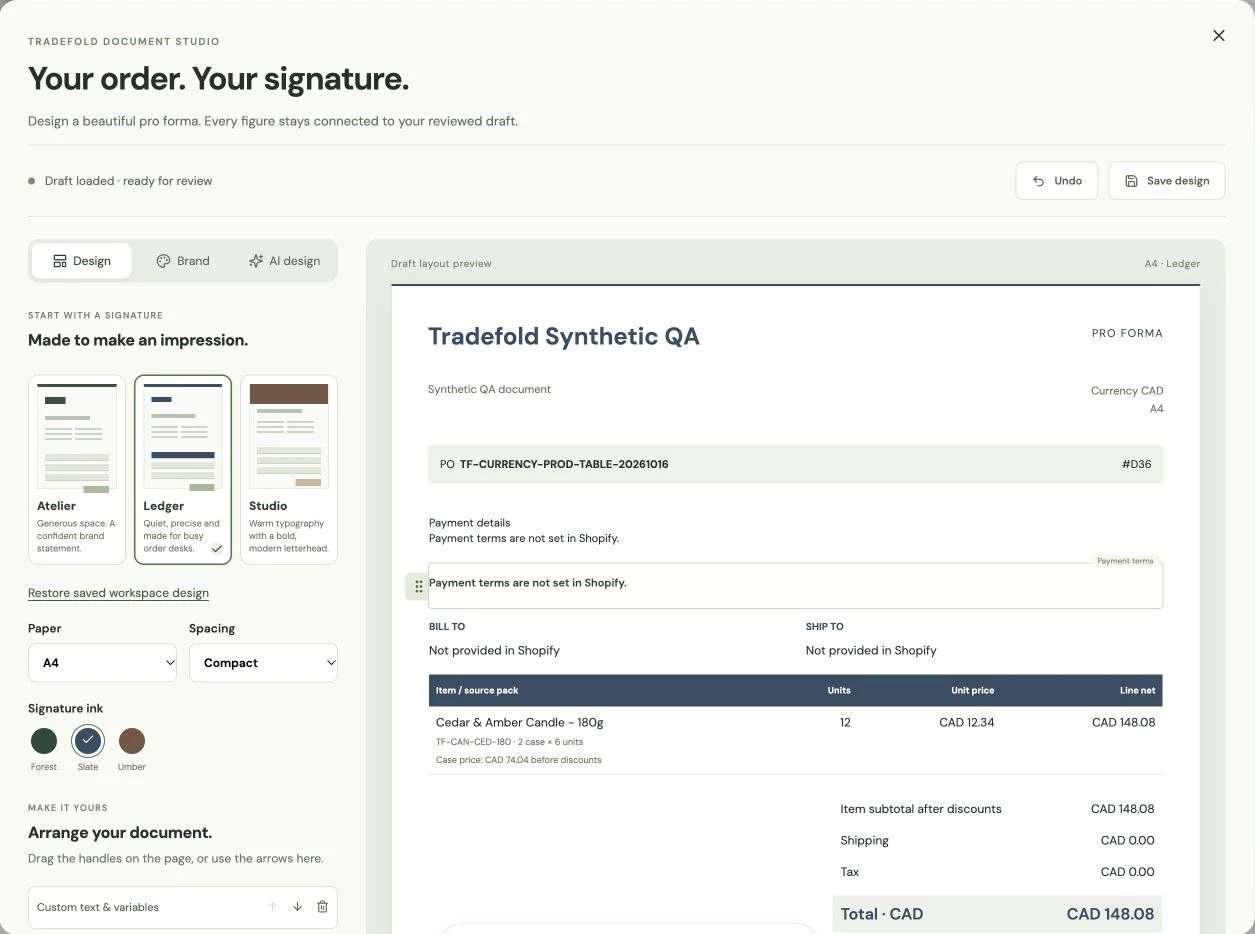
Approve the Shopify draft, then make its pro forma your own: three templates, drag-and-drop sections, reusable variables and AI design assistance. The amounts come from your reviewed draft.
AWS does not use your AI inputs or outputs to train its models. Tradefold checks retention and logging settings before every AI extraction. You control draft approval. Read our data policy ↗
THE REAL WORKFLOW, ON FILM
A short walkthrough of the real app.
Fictional order data, real draft creation.
FROM THEIR FORMAT TO YOUR WORKFLOW
One fictional order. Three simple steps.
No upload or account needed.
FIRST-ORDER SETUP HELP · INCLUDED ON ALL PLANS
Still entering buyer PDFs and emails into Shopify by hand? We’ll help you check the fit, bring in one representative order and review the details before you approve the draft.
Ask about your workflow before installing. No customer documents needed for the first enquiry.
See a fictional example: Greeting cards ↗Candles ↗
Tell us how orders arrive, roughly how many you process and where you enter them. We’ll help you decide whether Tradefold fits.
Once installed, import through the app. We’ll guide the product matches, case sizes and buyer-price checks beside the source.
You check Shopify’s calculation and approve the draft. Save confirmed buyer aliases and pack rules for repeat orders.
MEET YOUR DOCUMENT STUDIO
Turn a reviewed draft into a pro forma that looks like your business. Start with a beautiful template, ask AI for a style, then drag the details into place.
Style choices go to AI. Customer details do not. AI design receives five preset choices. Your typed text, logo, buyer details, order lines and amounts are excluded from this design request. How we handle data ↗
Included on all plans. Pro formas are not tax invoices or payment receipts.
ROOM FOR YOUR ORDER BOOK
The complete core workflow on all plans.
Start with one buyer. Build a repeatable process.
Studio fits this volume · $99 / month
We’ll guide one order’s import, product matches, cases and prices. One first-order setup and one repeat-order check, within 30 minutes total per store. Ask whether your workflow fits.
FREE START
10 successful Shopify drafts total per store
Try your first order. Check your next one.
STARTER
50 successful draft orders / paid billing cycle
For a smaller wholesale order book.
STUDIO
100 successful draft orders / paid billing cycle
For a steady wholesale order book.
STUDIO GROWTH
300 successful draft orders / paid billing cycle
For a fuller wholesale order book.
AI processing and source-intake limits are separate from successful draft allowances. All prices are USD; Shopify handles subscription approval and billing.
Free Start includes 10 successful Shopify drafts and 25 AI attempts total per store. Unused credits do not expire, and there is no automatic paid upgrade. Earlier trial drafts share the free allowance. Daily, storage and service capacity limits apply. Shopify confirms paid terms before you approve.
For incoming buyer purchase orders in your Shopify store currency. Tradefold does not convert currencies or replace a supplier purchasing system. Free Start includes 25 AI attempts total. Daily AI, source intake, storage and service capacity limits also apply. No-expiry credits do not promise indefinite file retention. Read the practical details ↗
Yes. First-order setup help is included on all plans. Ask us about your workflow before installing, or get help with a representative order with Free Start. We’ll guide product matches, case quantities and buyer prices; you review and approve the Shopify draft. Keep customer documents inside the app.
Yes. Install Tradefold from the Shopify App Store, select your plan and approve Shopify’s subscription terms. Choose Free Start for 10 successful drafts total and 25 AI attempts, with no expiry on unused credits and no automatic paid upgrade. Start with a representative buyer order and review the result before creating a draft.
Incoming wholesale buyer purchase orders in PDF, XLSX or CSV format, pasted order text, and orders received through your assigned inbox. For spreadsheets, choose the sheet and columns you want to import. AI-extracted details still need your review.
No. AI helps extract order details. You review the source, resolve product matches, quantities, units and prices, then explicitly approve creation of a Shopify draft order. A draft is not a payment or fulfillment.
You can resolve case quantities into units and save buyer-specific case rules and product aliases. Review the proposed match and unit size before approving the draft.
Yes. Link your buyer to a Shopify customer, then select an assigned company location. Tradefold reads contextual catalog prices, volume tiers, quantity rules, company addresses and configured payment terms. Your store must already have the relevant B2B setup. Payment terms can require an additional Shopify permission. Tradefold does not reserve stock or convert currencies.
No. AWS does not use your inputs or outputs to train its underlying models. Before each extraction, Tradefold checks that account retention is set to None and invocation logging is disabled; failed checks stop extraction. Limited AWS safety exceptions, Tradefold order history and email-provider handling are explained in our privacy policy.
Free Start includes 10 successfully created Shopify drafts total per store and 25 total AI attempts shared by order extraction and document design. Unused credits do not expire. There is no automatic paid upgrade. Earlier trial drafts count toward the same free allowance, and switching plans does not reset it. Uncertain draft results reserve a slot until checked. Failed or interrupted AI attempts count because they can still incur provider cost.
Daily AI, source intake, storage and service capacity limits apply on every plan. Your workspace shows current limits. No-expiry credits do not mean indefinite file retention. Choose a paid plan in Shopify when you need more; Shopify confirms its terms before you approve. Existing paid trials keep their approved terms.
Tradefold checks for duplicates and tracks draft creation. If a creation result is uncertain, it uses a recovery flow to check for the existing draft before retrying. You stay involved in resolving exceptions.
Yes. Open Create pro forma on an approved draft. Choose a template or use AI design for a style suggestion. Drag sections, add text and variables, set your branding and save the layout. Load the latest draft, review its details and totals, then export. AI design receives preset style choices, not customer or order data. A pro forma is not a tax invoice or payment receipt. Follow the builder walkthrough ↗
Contact hello@tradefold.app, visit our support page, or read the current privacy policy for how the application handles data.
GOOD PRACTICE, BEFORE THE NEXT ORDER
A practical six-step process, from keeping the original to giving final approval.
Read the guide ↗How to avoid confusing a case price, a unit price and an agreed buyer price.
Read the guide ↗LESS RE-ENTERING. MORE REVIEWING.
10 free drafts total · No expiry on unused credits · No automatic paid upgrade
Want a hand? Get first-order setup help ↗